


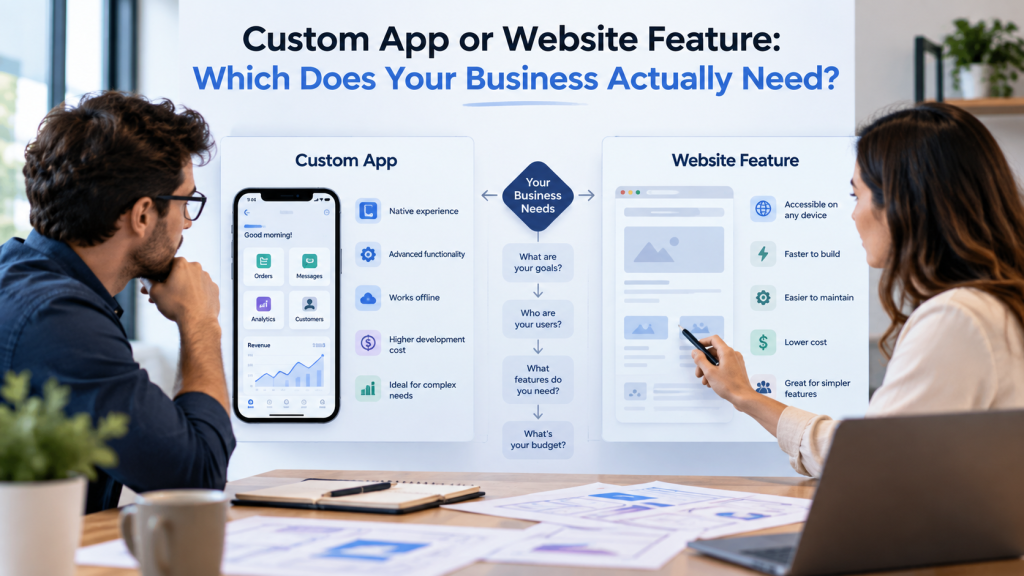
Businesses sometimes assume that any complex digital idea needs a custom app. A customer portal, quote calculator, appointment system, product configurator, order tracker, membership dashboard, or internal workflow may sound sophisticated enough to justify a separate application. In many cases, however, the business can achieve the same objective by adding the right functionality to its existing website. In other situations, forcing application-level requirements into a traditional website creates a system that is difficult to maintain and frustrating to use.
The right decision therefore does not begin with whether an app sounds more advanced. It begins with the user, the task, and the amount of functionality required. A business should understand who will use the system, how frequently they will use it, what data needs to be stored, which third-party systems must connect with it, whether offline or device-specific capabilities matter, and how the solution is expected to grow. Once those questions are answered, the choice between a custom app and a website feature becomes much clearer.
Start With the Problem, Not the Technology
A useful first question is: What should the user be able to do that they cannot do today?
Suppose a service company wants customers to request quotes online. That does not automatically require an application. A carefully designed form, conditional logic, document upload, CRM integration, and automated confirmation may solve the entire problem within the existing website.
Now imagine the same company wants customers to create accounts, manage multiple projects, approve quotes, upload documents, exchange messages, track project milestones, receive invoices, manage team permissions, and access historical records. The requirement has moved well beyond a simple website form and may justify application-style architecture.
This is why a strong app development project normally begins with requirements and workflows rather than the assumption that an app is already the correct solution.
When a Website Feature Is Usually Enough
A website feature is often appropriate when the functionality supports a relatively focused interaction and does not require an extensive user environment.
Examples can include appointment booking, calculators, product filters, quote forms, basic customer enquiries, interactive maps, simple portals, lead qualification, gated content, payment forms, or ecommerce functionality supported by an established platform.
Adding these capabilities to the website offers an important advantage: the visitor does not need to enter a separate system. The functionality sits directly inside the existing customer journey, branding, analytics setup, and search-visible website.
For many small and medium-sized businesses, improving the existing website is therefore the most efficient first solution.
When the Requirement Begins to Look Like an Application
A custom app becomes more appropriate as the system develops deeper state, workflows, permissions, and repeated user interaction.
Imagine a wholesale business where dealers need to log in, view account-specific pricing, create purchase orders, manage multiple shipping locations, track inventory allocations, download invoices, submit claims, and communicate with account managers.
That is no longer simply a page with additional functionality.
It is a working environment.
The same is true when employees need dashboards, role-based permissions, workflow approvals, complex data management, or operational tools that are used every day.
The question is not whether the interface runs in a browser. Many sophisticated applications are web applications. The distinction is about complexity and purpose rather than whether the software is accessed through Chrome or installed from an app store.
Do You Need a Mobile App or a Web App?
“Custom app” can describe several different products.
A web application runs through a browser and can provide account systems, dashboards, complex workflows, and interactive functionality without requiring installation from an app store.
A native mobile application is built specifically for platforms such as iOS or Android and may provide deeper integration with device capabilities.
For many businesses, a web application is enough because customers and employees need a system they can access from different devices without installing software.
A native mobile app becomes more compelling when the experience depends heavily on device functions, frequent mobile use, push notifications, camera integration, location features, offline operation, Bluetooth, or other capabilities where a dedicated mobile experience provides real value.
Do not build a mobile app merely because competitors have one.
If customers will use the function twice a year, asking them to install an application may create more friction than value.
Consider How Often People Will Use It
Usage frequency is one of the best decision signals.
A visitor calculating a project estimate once before contacting a company probably does not need an account-based application.
A customer managing weekly shipments may.
An employee completing the same operational process dozens of times every day may benefit greatly from custom software because even small workflow improvements can save meaningful time.
This means an internal application can make financial sense with a relatively small number of users if those users interact with it constantly, while a consumer app with thousands of potential customers may struggle to justify development if most users only need it once.
Evaluate frequency alongside complexity.
Consider Whether Users Need Accounts
User accounts do not automatically require a custom application. Ecommerce websites have customer accounts, membership sites have accounts, and many established platforms handle authentication well.
The question is what happens after the user logs in.
If the customer only needs to view orders, update contact information, or access simple content, extending the website may be enough.
If different user types need different permissions, dashboards, stored workflows, messaging, document management, project data, approval processes, and extensive account-specific functionality, custom application architecture becomes more attractive.
Authentication is only the entrance. The complexity behind the login is what matters.
Integrations Can Change the Decision
The more systems the solution needs to communicate with, the more carefully architecture should be considered.
A simple website form might send leads to a CRM through an existing integration.
A more complicated system may need two-way synchronization with an ERP, warehouse database, accounting platform, CRM, payment provider, shipping service, identity platform, and internal reporting system.
At some point, the website is no longer simply presenting information. It becomes a major interface for business operations.
That does not automatically require a separate app, but it often requires a custom backend and development approach more sophisticated than installing another website plugin.
Businesses should map the required data flows before choosing the technology.
Existing Platforms Can Eliminate the Need for Custom Development
Before building anything from scratch, check whether the business problem is already solved well by established software.
A company wanting appointment scheduling may not need custom development if a mature booking platform integrates properly with the website.
The same applies to ecommerce, CRM, learning management, memberships, help desks, payment processing, customer support, document signing, and many other common business requirements.
Custom development creates the most value when the workflow is genuinely specific, when available platforms create major operational limitations, or when integration requirements make off-the-shelf tools impractical.
Building custom software to recreate a standard function can increase cost and maintenance without giving the business a meaningful advantage.
Compare Cost Beyond the Initial Build
The cost of a digital solution is not only the launch price.
A custom application may require hosting, monitoring, security updates, API maintenance, ongoing development, operating-system compatibility, database work, bug fixes, and support.
A website feature can also require maintenance, particularly when it depends on plugins or external APIs, but the overall operational burden may be lower when the feature is relatively contained.
When comparing options, estimate the cost over several years rather than only comparing development proposals.
A $15,000 website feature maintained within an existing system may be more economical than a $60,000 custom app with ongoing development if both solve the same business problem. On the other hand, a custom system that replaces several expensive subscriptions and saves hundreds of employee hours can justify a much larger investment.
Cost needs to be connected to business value.
Consider Speed to Launch
If the business needs to solve a problem quickly, extending the existing website may offer a shorter route when the functionality is well understood and compatible with the current platform.
Custom applications usually involve more discovery, architecture, design, development, testing, deployment, and maintenance planning.
That additional work is not wasteful when the complexity requires it.
The mistake is paying for application-level infrastructure when the business only needs a straightforward feature.
A useful digital strategy should choose the simplest solution that meets the real requirement while leaving reasonable room for future growth.
Think About Future Growth Without Overbuilding Today
Businesses sometimes justify expensive custom applications by listing everything the system might need five years from now.
Future planning is important, but excessive speculation can result in building functionality that is never used.
A better approach identifies which requirements are certain, which are likely, and which are merely possible.
The initial architecture should avoid obvious dead ends, but the first version does not need every theoretical future feature.
In many cases, a website feature can validate demand before the company invests in a full application. If customers use it heavily and request additional functionality, the business has real evidence for the next development stage.
Security Requirements May Influence the Architecture
A simple marketing feature and a system storing sensitive customer or operational information have different security requirements.
Applications with authentication, financial information, private documents, employee records, or complex permissions need stronger controls around data access, session management, logging, backups, software updates, and security testing.
That does not automatically mean the solution must be a native app. A properly designed web application can provide strong security.
It does mean the project should not be treated as a normal website plugin simply because the user interface appears inside a browser.
As functional complexity grows, the technical planning needs to grow with it.
Maintenance Ownership Should Be Decided Before Development
Ask who will maintain the solution after launch.
If a website feature is built inside WordPress, Shopify, or another CMS, the existing website team may be able to manage routine maintenance.
A custom application may require developers who understand its codebase, hosting environment, database, integrations, and deployment process.
Before approving the project, the business should understand documentation, source-code ownership, hosting, support arrangements, update responsibilities, and what happens if the original development team is no longer available.
A solution that works perfectly at launch but cannot be maintained affordably is not a good long-term system.
SEO Can Matter for Public-Facing Functionality
If the content or functionality needs to attract users from Google, keeping important public information inside a crawlable website can provide advantages.
For example, a service calculator may attract search visitors when it sits within a useful public page containing explanatory content. Placing the entire experience behind a login or inside an app can remove that search-discovery opportunity.
This does not mean every function should be indexable.
Private dashboards and operational applications obviously serve a different purpose.
But when customer acquisition depends on organic visibility, the relationship between the functionality and SEO should be considered before deciding where the feature lives.
A Practical Decision Framework
The following comparison can help clarify the choice:
| Requirement | Website Feature | Custom App |
|---|---|---|
| Simple lead capture | Strong fit | Usually unnecessary |
| Calculator | Strong fit | Sometimes |
| Appointment booking | Strong fit | Only for complex workflows |
| Basic customer account | Often sufficient | Sometimes |
| Complex dashboards | Limited | Strong fit |
| Role-based workflows | Possible but may become complex | Strong fit |
| Heavy daily usage | Sometimes | Strong fit |
| Offline functionality | Weak fit | Strong mobile-app case |
| Device integration | Limited | Strong mobile-app case |
| Complex data workflows | Limited | Strong fit |
| Public SEO content | Strong fit | Depends on architecture |
| Fast launch | Often easier | Usually longer |
| Lower maintenance | Often | Usually higher |
This table should not replace technical discovery, but it provides a useful starting point for the conversation.
When You Should Start With a Website Feature
A website feature is usually the sensible first choice when the required functionality is narrow, primarily customer-facing, compatible with the existing CMS, and does not require complex account logic or extensive data management.
It can also be a good validation strategy. Instead of investing immediately in a large custom platform, the business can launch a smaller feature, measure adoption, learn how customers use it, and expand only when the evidence supports further development.
This approach reduces both financial and product risk.
When a Custom App Is Worth the Investment
Custom development becomes easier to justify when the system supports a process central to how the business operates or differentiates itself.
If employees spend significant time working around the limitations of existing software, customers need functionality competitors cannot provide, or several disconnected platforms are creating operational problems, a custom application can deliver value well beyond the interface itself.
The strongest custom applications are not built because the company wants an app.
They are built because the company has a valuable workflow that existing tools cannot support effectively.
Final Thoughts
The choice between a custom app and a website feature should be based on what the business needs users to accomplish, not on which option sounds more advanced.
If the requirement is focused, public-facing, relatively simple, and closely connected to the existing website, adding the right feature may be the fastest and most economical solution.
If users need complex dashboards, repeated workflows, advanced permissions, substantial data management, deep integrations, or application-specific device capabilities, custom development may provide a stronger foundation.
Before choosing either path, define the workflow, users, frequency of use, integrations, data requirements, maintenance responsibilities, budget, and future growth expectations. Then look for the simplest architecture that can support those requirements reliably.
Sometimes that will be a better website.
Sometimes it will be a custom application.
The important part is solving the business problem without paying for complexity the business does not actually need.
FAQs
Is a custom app always better than a website feature?
No. A website feature may solve the requirement faster and at lower cost when the functionality is relatively focused.
When does a website feature become too complex?
When it begins requiring extensive workflows, permissions, dashboards, data processing, integrations, or application-level functionality, a custom architecture may become more appropriate.
Do customer accounts require a custom app?
Not necessarily. Many websites can support customer accounts effectively. The complexity of what users need to do after logging in is more important.
Does a custom app have to be a mobile app?
No. A custom app can be a web application accessed through a browser. Native mobile apps are more relevant when device-specific features or frequent mobile use justify them.
Should I build custom software if an existing tool can do the job?
Usually only when the available tools create important limitations, poor integrations, high long-term costs, or cannot support the business’s specific workflow.
Which option normally costs more to maintain?
Custom applications generally require more specialized ongoing maintenance, although the actual cost depends on complexity and architecture.
Can we start with a website feature and build an app later?
Yes. For many businesses, this is a useful way to validate demand before making a larger custom-development investment.